This application is a CSS-based web site document management system. It is intended to be a 99% complete application where the layout customization is mostly performed using a normal Notes Client rather than the Designer client.
The CSS layout for the 2008a template is a modular type of structure. The types of components are fixed. But the layout can be changed based on the CSS design applied. The template layout was designed to be as flexible as possible. The content is assumed to use the following structure:
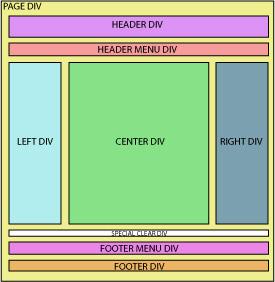
The CSS is applied at the DIV (layer) level using a Domino CSS Resource in the application.
This customization of the presentation is via stylesheets and DIVs. A "DIV" is equivalent to a Notes Layer. Layers allow absolute or relative placement of other layers and objects (pictures, tables, and text) to other layers.
- The PAGE DIV is the whole page object. It is contained with the <BODY> tags. It allows the presentation page area to have a different color and/or background than the BODY area and allows the page area to be commonly left justified or centered. The PAGE DIV contains all the other DIVs. Most of the page area DIVs can be included or omitted by changing the application profile.
- The HEADER DIV contains a subform called "header". This header subform is defaulted to "prohibit update" from the template as it is heavily customized most of the time.
- The HEADER MENU DIV contains the menu of the web site. It's assumed to be a horizontal menu. It is automatically updated by specifying within the pages, events, and stories/news items where they are located in the menu or footer. The menu has main categories which can be links. Each category can have a single listing of links underneath the category.
- The LEFT DIV and the CENTER DIV are contained by another DIV which gives the ability for these columns along with the RIGHT DIV column to always be together. To keep the FOOTER MENU DIV and FOOTER DIV below these DIVs, we use the special CLEAR DIV. It is now shown in the image above for clarity.
- The LEFT DIV and the RIGHT DIV allow "teasers" to be placed in either/both locations when clicked display in the CENTER DIV. These are commonly used for news items and events. They display on every page of the site and do not change as you navigate pages. Pages, calendar events, and news items can all be displayed on the side columns. What is displayed depends on the "Content Block" setup in the application profile and whether the individual pages are setup (checked) to be displayed in these teaser columns.
- The CENTER DIV is the main content area. This is where the web page content is displayed. The web page's content area can contain rich-text objects. This allows the general users to easily customize the layout of each CENTER DIV area by structuring this part of the page with tables and pictures along with the page text. This call means that the application cannot be maintained from the web using a web browser.
- The special CLEAR DIV was mentioned above.
- The HEADER MENU DIV contains the secondary menu of the web site. It is assumed to be a horizontal menu. Like the HEADER MENU DIV, it is populated dynamically. It cannot have sub items. The footer categories only are the links.
- The FOOTER DIV contains a subform called "footer". This footer subform is defaulted to "prohibit update" from the template as it is heavily customized most of the time.
See the application About and Using documents for more setup information.
previous page
|