vSphere vDP Appliance has the following error:
The most recent checkpoint for the vDP appliance is outdated.

To repair:
1. Open the console of the VM appliance.
2. Click Login.
<login with root credentials>
3. Stop the vDP Controller services:
# dpnctl stop
4. List the drives:
# mount

5. Unmount the drives so we can check them, check them, and remount them.
# umount /data01
# umount /data02
# umount /data03
# xfs_check /dev/sdb1
# xfs_check /dev/sdc1
# xfs_check /dev/sdd1
# mount -a
6. Verify the three data drives are remounted.
# mount
7. Restart the vDP services. Wait for the services to all start and for prompt to return.
# dpnctl start all
8. Stop the maintenance service, and do a manual checkpoint.
# dpnctl stop maint
# avmaint checkpoint --ava
Note: Last command should return the checkpoint is not valid:
isvalid="false"
9. Run the HFSCheck scan/fix and wait (up to hours).
# avmaint hfscheck --full --ava
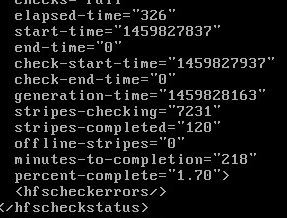
The prompt will return LONG before the check is complete. If you initiate a check status, you'll get something like this:
10. Verify the HFSCheck.
# avmaint hfscheckstatus --ava
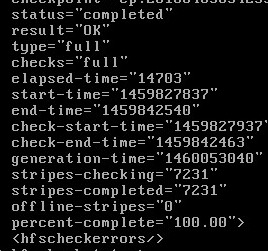
Note: the scan should return a status="Completed" and a result="OK"
11. Start back up the maint. service:
# dpnctl start maint
previous page
|