Issue:
Recently applied 5.5 Update 3 patch to the vCenter appliance. After reboot, MS Windows vSphere client cannot connect to vCenter after entering server address and credentials.
vSphere Web Clients loads but then displays error at the top of the screen saying:
Could not connect to one or more vCenter Server systems:
https://myserverdnsorip:443/sdk
Tasks do not process. The virtual machines and the hosts appear to be running fine.
Solution:
Logged into the VMware vCenter Server Appliance at the 5480 management port again.
https://myserverdnsorip:5480
On the Summary tab, under the vCenter heading, I noticed that the Server was Stopped. Clicked Start. Waited about one minute for screen to display starting services and display that server was now Running.
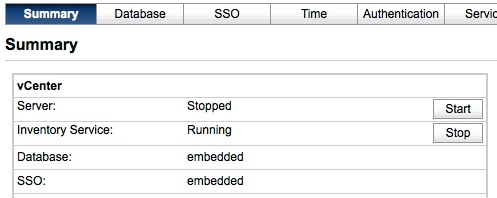
Note: You may also have to scroll down to the Services section, and start the vSphere Web Client, as well.
previous page
|