Objective:
Add an analog telephone type 'thinning' effect to a vocal for use when vocals switch to being remotely on the telephone in music / video scenes.
Plug-in Tools:
In the Digidesign/Avid EQ tools, there are two Telephone A and Telephone B presets in the EQs. They make the audio sound like an old telephone or a vintage radio. You can use them as a starting place or follow the steps below to create the sound.
In the Waves Q-10 parametric EQ tool, it has a AM radio setting and a Telephone setting.
Steps:
1. Move the parts of the vocal to get the effect to a new track.
2. Add a mono 7 band EQ to the track.
(plug-in --> EQ --> EQ 7-band (mono) )
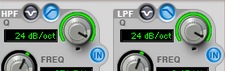
3. Activate filter cuts using the HPF and LPF sections in the plug-in dialog.
Enable the cuts via the 'IN' buttons offset below the HPF and LPF knobs.
Set the cuts to drop the ends rather punch using the icons to the left of each knob.
Rotate the HPF and LPF knobs to change from the default 6dB/oct value to 24dB/oct.
Set the HPF frequency using the HPF's FREQ knob to around 500 or 600 Hz.
Set the LPF frequency using the LPF's FREQ knob to around 2.5 or 5 kHz.
4. Add an eq boost within the 1.5 kHz to 2KHz range to add a bit of presence.
Also, increasing gain, or compressing and boosting the resultant vocal will cause occasional hitting "red", which will reduce the dynamic range more realistically and can add somewhat realistic distortion if desired.
5. Alternately, add a distortion filter to make the call sound more scratchy if desired.
This can be Amplitude with a light mix, or any other effect that will add distortion and noise into the voal signal.
6. Add a bit of reverb if desired (Just the verb part w/no early reflections, and no direct ones).
previous page
|