Error Message:
Pull w/in the vRO Git History page, produces the following error:
"The workflow name contains invalid characters (\,/). Name: null. ID: null"
Unfortunately, the vRO product does not list the offending workflow_name.xml, name. There is an open SR 23431478205 to add the name to the error message to simplify troubleshooting.
Reason:
This occurs when the XML workflow files have invalid XML formatting, or are empty (0 bytes).
Obviously, empty xml files will not have a name or ID.
Resolution:
First, look and see if the current commit was to remove a workflow. If a workflow is removed in vRO, it is not deleted in git, but becomes empty and has a 0 bytes file size. Simply remove that file using the git command line or git web UI.
If the file is not know because multiple workflows or actions were updated, then we can:
- locate the offending scripts using the latest git commit history, and in Aria (vRO) Orchestrator, find the last commit that was pulled successfully. The following/next date commit after that commit should contain the workflow with the issue.
- navigate the workflow tree in Git and open the folders with the latest commit date. Afterwards, scan the file size of the workflow and look for the 0 sized workflow.
Notes:
- The 0 size issue will follow the promotion from DEV to QA to Prod. After each promotional merge commit or pull request, the file needs to be check to see if deleted or has 0 size and manually remove in the git web UI.
- To locate the last commits contents:
mygithub.com --> myrepositoryname --> nn commits.
Click the nn Commits. It's a link hidden in plain sight.
Note:
The view is in ascending order, so you'll need to Show More until you reach the bottom, and then work your way back up.
See the image below for the timepiece icon and the number of commits.
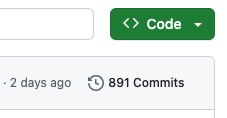
One of the last commits will be a cause of the issue.
- Alternate method to get the latest commits:
Hack the repository URL to load the page/view of comments:
https://mygithub.com/projectname/commits
Additional Clean-up Notes:
1. If there are empty files, either delete them or re-merge (promote) their branch code that was committed.
(Hint: if there is a folder of empty files, it's quicker to carefully delete the whole folder. That can be done in the web GUI by using the three dots ( . . . ) on the right and choosing Delete.
2. If the file seems to have just been converted, you can edit the file w/in the web GUI, or increment the version in vRO, re-push the change to the originating branch, and recommit again. Since the version number was incremented, git will have something to commit again. (We tried reverting and recommitting, but that has not worked as reliably.)
3. If there is a local file that needs to be locally purged:
a. Check the status to see if there are untracked (new) files:
> git status
- read output - review any red-colored files not current added to the commit
- if all of the files are good to correct the issue, issue the command: > git add . (include the period, it's a wild-card)
- if all or some of the files need to be removed/purged first, perform the following:
> git clean -n -d
- read output - should be the same red-colored not-included-in-a-commit list as the previous command
- if you want to remove/purge the local updates, perform: > git clean -fd
- if you want to remove/purge a selection of the files, perform: > git clean -i
- if you want to remove/purge one file, perform: > git clean -f "full/path/to/filename"
4. More advanced clean-up can be done with git revert and git clean.
Git revert and git clean use the shorter hexadecimal ID when viewing commit history.
The distinction is that git revert keeps the history if you use it to "undo", because you don't actually undo, you just go around the block backwards to where you were before, and the git history of those actions are maintained. Git reset is more like an undo as in to go-back-in-time.
When specifying the ID, which ID you use depends on if you are doing a revert or a commit:
- git revert requires the id of the commit you want to remove keeping it into your history
- git reset requires the commit you want to keep, and will consequentially remove anything after that from history.
previous page
|