A DMX Overview and Primer:
Definition:
"Digital Multiplex" - As of 2008, it was last revised to DMX512-A:
A USITT standard digital protocol for controlling light levels and colors and other DMX devices like fog and intelligent / LED lighting
- Uses voltage changes as a digital signal, commands are looped in the teletype format Mark, Space, and Break with up to 512 slots channel data containing ONE byte.
- Select a console that outputs a 8 uS and meets the DMX512/1990 or later specification - minimum idle time after the MOB (mark after break code)
Architecture:
- The entire system is called a "universe". The devices are called "nodes" or "fixtures" and are typically in a serial daisy chain also called the "bus".
- The master device is the console / controller with the faders and control knobs. Each OUT in the console / controller can control a single universe.
- The slave devices have "IN" and "OUT" or "THRU" connectors.
- A terminator is added to the last slave device.
- Bus maximum length is 1,200 meters (3,900 ft)
- Maximum number of fixtures per chain is 32, however 16 is often recommended as the limit.
- Uses a 5 pin XLR cable (XLR-5), however 2 pins are often not used, so vendors and users commonly ignore the standard and use standard XLR connections and cables. Fixed / permanent systems often use RJ-45 8 pin connectors, too.
- Light brightness (or a color if LED) is divided into 256 steps.
- Theoretical fixture limit per universe is 512, but is commonly far less. For example, if each fixture / node uses 8 addresses, then the limit is 64 devices.
XLR-3 Pinout:
1. Ground
2. Data 1- (primary data link)
3. Data 1+ (primary data link)
XLR-5 Pinout:
1. Signal Common
2. Data 1- (primary data link)
3. Data 1+ (primary data link)
4. Data 2- (secondary / optional data link)
5. Data 2+ (secondary / optional data link)
RJ-45 Pinout
1. Data 1+ (primary data link)
2. Data 1- (primary data link)
3. Data 2+ (secondary / optional data link)
4. Not Used / Assigned
5. Not Used / Assigned
6. Data 2- (secondary / optional data link)
7. Signal Common (0 V) for Data 1 (#1 and #2)
8. Signal Common (0 V) for Data 2 (#3 and #6)
Cabling Tips:
- Always use quality professional grade DMX cables.
- - If you are building cable:
- - - Cat 5 cables were tested by ESTA and found compatible.
- - - EIA485 cables were tested and typically meet DMX512A.
- Standard audio Microphone cables do NOT have the correct impedance and should not be used.
- Use shortest cable possible between fixtures but do not cause excessive tension.
- Do not over pinch the cable when using zip ties.
- Run cables away from power cabling.
- Always use a terminator at end of chain (see Termination below).
- Don't split the cable (see Splitting below).
- Limit each chain of fixtures to 16 devices or less.
Hardware Controls:
- Hardware controllers often have different modes which sets how they carve out the addresses, but typically each controller channel is for one fixture's address and are typically in a 1 to 1 relationship.
- The hardware controllers can also be set-up to assume devices have say 8 or 16 addresses each. If the devices uses less than that number of addresses, those extra addresses are wasted on the controller; if more are required, then the device either cannot be used or part of it's functionality cannot be used.
- Typically, you want to do a simple 1 to 1 relationship. In the example below, the controller has been divided so that each device gets 6 channels.
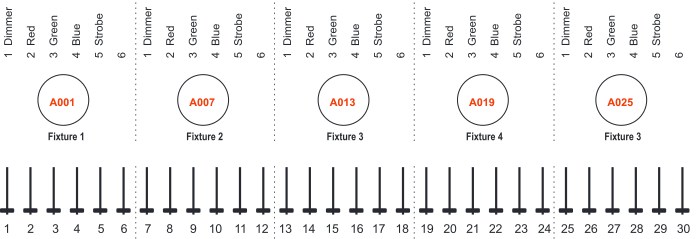
In the above example channel 6 is NOT used and wasted in the controller.
If you give two lights the same DMX starting address, then both lights act as one and are "grouped".
Splitting:
Splitting w/ a "wye" cable is not dependable due to the signals going down the split legs corrupt signals going down the other leg.
Use DMX Optical Splitter or a Wireless Transmitter and Receivers to buffers each network daisy chain properly.
Terminations:
Use a terminator to keep commands/signals from going back up the serial cable connections. This is called "reflections". The impedance should match the impedance of the cable assembly.
Often the terminator uses a resistance of 120 ohms.
Safety Cable with Beaner:
Always use a Safety cable for each fixture / device in case the fixture mount fails.
_____________________________________________________________________________________________________
Glossary:
Beam Angle
- Angle where 50% or more of the maximum brightness is maintained from the center (brightest) point of the beam.
DMX512 Lights
- Indicates that this fixture can be used in a DMX universe and guarantees a level of compatibility. You may also see DMX512-A which indicates an update to the specification.
DMX Dimmer Controller
- Indicates that a "master" lighting controller unit's controller channel can dim a fixture typically in an 8-bit / 256 steps of incremented light levels. If the controller is referred to as a "dimmer pack" then do not use it with a LED fixture as they are generally not compatible (and can burn something out or just not work); use a DMX Intelligent Lighting controller.
DMX Intelligent Lighting Controller
- Indicates that a "master" lighting controller has features for advanced controls (e.g. pan and tilt) and use "DMX intelligent lighting fixtures".
Field Angle
- Angle where 10% or less of the maximum brightness is maintained from the center (brightest) point of the beam.
Master / Slave Mode
- One of the 4 common modes of a DMX lighting fixture device. Fixture is used where one device on the network is the master (instead of the controller) over all the other slave devices. Best results are typically with identical devices. For DMX control, use "groups" where all the fixtures / devices have the same (starting) address.
Note: Do not mix modes on a daisy chain.
MIDI Triggering
- Indicates that lighting is triggered via a MIDI signal from a "lighting scene". This is not standard across all controllers so you must purchase a controller compatible with the fixture.
Quad LED
- Indicates that there are 4 RGB LEDs are clustered together rather than one under the other (red, green, blue respectively). Layered "traditional" LED lights have shadows especially a close distances because of the stacking. Therefore, it is considered superior.
Sound Active Mode
- One of the 4 common modes. It sets a device to listen on a built-in microphone to trigger / light-up based on an audio level. It is NOT compatible with DMX control. Without using scenes, this mode can be accomplished by assigning a master device in Sound Active Mode with the rest of the chain set as slaves. If using scenes, program scenes and chain them together in a case-type sequence.
Stand-alone Mode
- One of the 4 common modes of a DMX lighting fixture device. Fixture is used w/o a DMX universe / network. It is either programmed on the device or via a remote for the device.
previous page
|